Portfolio Categories: Website

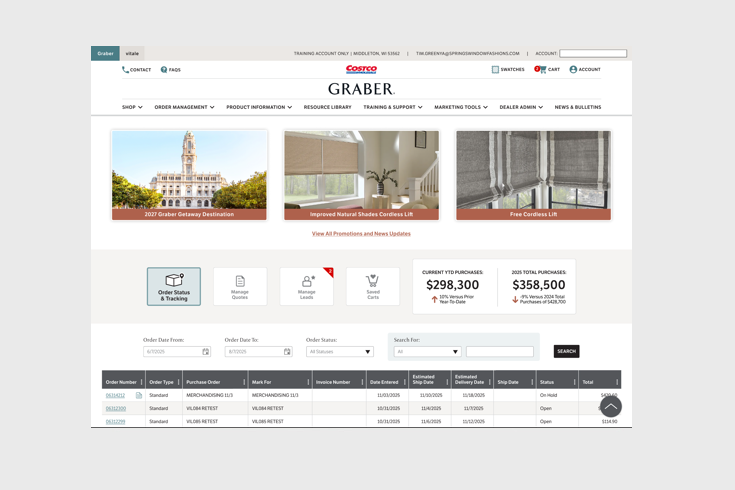
Graber Dealer Portal Dashboard

Graber Blinds Dealer Portal Homepage Dashboard Concept. [cl_column width="2/3"][cl_media shadow="0" custom_link="https://www.figma.com/proto/zmrg3DG8tQi57IOsy2wP4X/Graber-Dealer---Design-Library?page-id=0%3A1&node-id=46-3236&viewport=373%2C327%2C0.07&t=ZcQ3Edpgt7NlGjej-1&scaling=scale-down&content-scaling=fixed&starting-point-node-id=46%3A3236" target="_blank" image="id:623|url:https://nimmot.net/wp-content/uploads/2026/02/dealer-portal-dashboard.png"][cl_column width="1/3" col_sticky="1"] Dealer Homepage Dashboard This is an early concept of the Graber dealer portal homepage. After reviewing site analytics and session recordings, it was confirmed that users were entering the portal and immediately clicking off to other sections of the site. I created more of a dashboard homepage layout. Incorporating the most visited sections of the site, the users will be able to get the information needed without having to leave the initial homepage. Category Website ToolFigma
Continue Reading

Graber Visualizer Desktop v2

Graber Blinds Version 2 concept of Graber Blinds product visualizer for desktop website. [cl_column width="2/3"][cl_media shadow="0" custom_link="https://www.figma.com/proto/ehdgpAa3XWYLzyJvCMT8tw/Tim-Greenya-Samples?node-id=402%3A4264&starting-point-node-id=202%3A1182&scaling=scale-down&hide-ui=1" target="_blank" image="id:489|url:https%253A%252F%252Fnimmot.net%252Fwp-content%252Fuploads%252F2022%252F11%252Fvisualizer-desktop-2.jpg"][cl_column width="1/3" col_sticky="1"] Product Visualizer Desktop v2 Concept This is an early concept of the desktop version of the Graber Visualizer tool. After viewing more analytics and customer feedback, I am concepting ways to make the tool more user friendly and increase dealer requests for consultations. Category Website ToolFigma
Continue Reading
Website Product Page

Graber Product Page Mock-up

Graber Blinds Product page re-design for Graber Blinds website. [cl_column width="2/3"][cl_media shadow="0" custom_link="https://www.figma.com/proto/ehdgpAa3XWYLzyJvCMT8tw/Tim-Greenya-Samples?node-id=802%3A9522&scaling=min-zoom&page-id=0%3A1&starting-point-node-id=802%3A9522&show-proto-sidebar=1&hide-ui=1" target="_blank" image="id:593|url:https%253A%252F%252Fnimmot.net%252Fwp-content%252Fuploads%252F2023%252F02%252Fgraber-product-page.jpg"][cl_column width="1/3" col_sticky="1"] Product Page Mock-up Graber Blinds wanted to update the look and feel of their product pages. I developed this concept to incorporate all of the current page elements into a design that is more user friendly. The design also works better for responsive design. I also incorporated a concept of a stripped down visualizer tool element into the header of the page for customers to be able to get an idea of what the product looks and functions like on a window. CategoryWebsiteToolFigma
Continue Reading

Bali Product Page

Bali BlindsProduct page re-design for Bali Blinds website.[cl_column width="2/3"][cl_media shadow="0" custom_link="https://www.figma.com/proto/ehdgpAa3XWYLzyJvCMT8tw/Tim-Greenya-Samples?node-id=302%3A1850&starting-point-node-id=202%3A1182&hide-ui=1" target="_blank" image="id:89|url:https%253A%252F%252Fnimmot.net%252Fwp-content%252Fuploads%252F2017%252F04%252Fbali-product-page.jpg"][cl_column width="1/3" col_sticky="1"]Product Page Concept Bali Blinds wanted their product pages to look more like an e-commerce product page. I developed this concept to incorporate all of the current page elements into a design that users are more familiar with when shopping for products. CategoryWebsiteToolFigma
Continue Reading

Graber Visualizer Desktop v1

Graber BlindsRe-design of initial Graber Blinds product visualizer.[cl_column width="2/3"][cl_media shadow="0" custom_link="https://xd.adobe.com/view/27b229a2-6702-4038-8f6d-54bc65ef0827-72e1/" target="_blank" image="id:485|url:https%253A%252F%252Fnimmot.net%252Fwp-content%252Fuploads%252F2022%252F11%252Fvisualizer-desktop-1.jpg"][cl_column width="1/3" col_sticky="1"] Product Visualizer Desktop v1 Concept I developed this re-design of the Graber Blinds product visualizer tool for their website. After viewing user testing videos, I was able to determine that the overall consensus was that the tool was overly complicated and cumbersome. I created this concept with a right hand tool bar to consolidate the most used features of the tool. This cut down on the confusion and increased use times and decreased bounce rates. Category Website Tool Adobe XD
Continue Reading

Graber Desktop Nav

Graber BlindsDesktop navigation re-design for Graber Blinds website.[cl_column width="2/3"][cl_media shadow="0" custom_link="https://www.figma.com/proto/ehdgpAa3XWYLzyJvCMT8tw/Tim-Greenya-Samples?node-id=217%3A1209&starting-point-node-id=202%3A1182&hide-ui=1" target="_blank" image="id:457|url:https%253A%252F%252Fnimmot.net%252Fwp-content%252Fuploads%252F2022%252F11%252Fgraber-desktop-nav.jpg"][cl_column width="1/3" col_sticky="1"] Desktop Nav Concept Graber Blinds wanted a more user friendly navigation option for customers to browse their website. I developed this dropdown navigation concept to make it easier for customers to get to pages on the website in the least amount of clicks. Category Website ToolFigma
Continue Reading

Graber Product Visualizer – Tablet/Desktop Landscape

Graber BlindsTablet/desktop landscape app concept for Graber Blinds product visualizer.[cl_column width="2/3"][cl_media shadow="0" custom_link="https://www.figma.com/proto/ehdgpAa3XWYLzyJvCMT8tw/Tim-Greenya-Samples?type=design&node-id=1301-147292&t=mwIplOdaZRYCU3qh-0&scaling=min-zoom&page-id=0%3A1&starting-point-node-id=1301%3A147292" target="_blank" image="id:440|url:https%253A%252F%252Fnimmot.net%252Fwp-content%252Fuploads%252F2022%252F11%252Fsprings-desktop-slider.jpg"][cl_column width="1/3" col_sticky="1"]Product Visualizer Concept - Tablet/Desktop Landscape This is an app concept for the tablet/desktop landscape version of the Graber Visualizer tool. The main focus of the app is for users to browse the product selections and eventually contact a dealer. It allows users to virtually see what products would look like in their homes. Users can pick a sample room or upload a picture of their own. I created a persistent bottom tool bar navigation that houses all the most used features of the tool for easy access. All of the other non-essential items are housed under the hamburger menu so not to distract the user from the main focus of the tool. CategoryWebsiteToolFigma
Continue Reading